Choose your accounting regime and method
Tell the app whether you keep tax records or double-entry books, and whether income counts when it's invoiced or when it's paid.
Your regime decides which books the app keeps for you. Tax records (Daňová evidence) keep a Cash Book of money in and out. Double-entry bookkeeping keeps a full journal, ledger and balance sheet.
Your method decides when income and costs count in your reports: Cash counts them when the money moves, Accrual when the invoice is issued. Set both before you rely on the numbers.
Before you start
Accounting is available on Solo and up. Tax records are on Solo; double-entry bookkeeping is on Solo Pro and up. On Solo, the Regime list doesn't offer double-entry at all.
If you're a team member rather than the owner, changing these settings needs the Bookkeeping permission. Without it you'll see the page read-only, with a note at the top saying so.
Set your regime and method
- 1Open Settings from the left sidebar. Under Accounting, choose Regime & method.
- 2Under Accounting Regime, open Regime and pick Tax records (Daňová evidence), Double-entry bookkeeping (Podvojné účetnictví) or Flat-rate tax (Paušální daň). A short description of the one you picked appears below it.
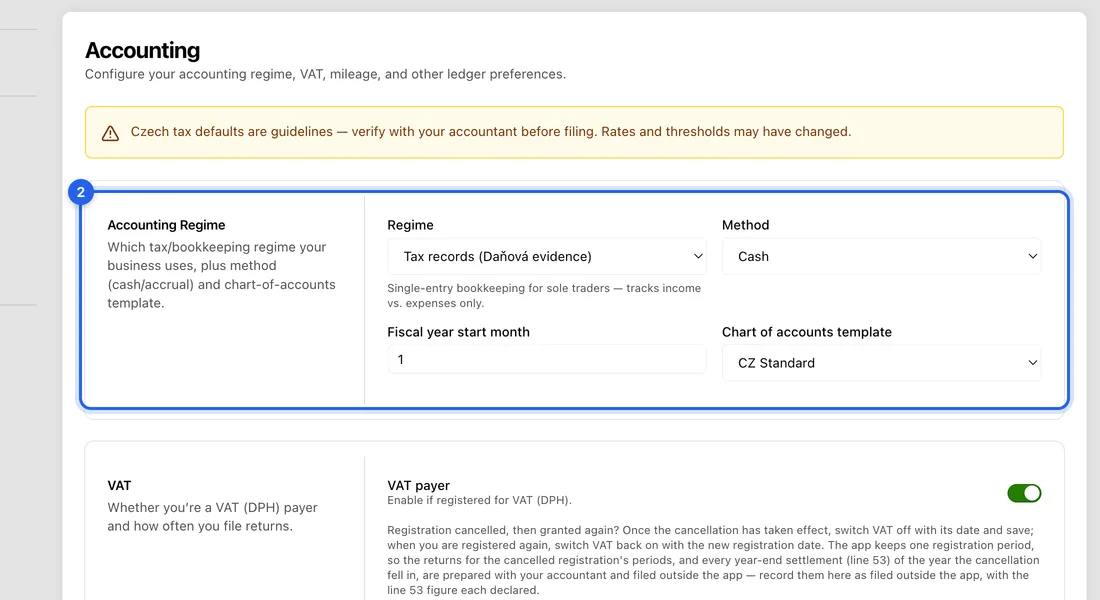
- 3Open Method and pick Cash or Accrual. If you keep tax records, Cash matches how they work.
- 4Check Fiscal year start month (1 is January) and leave Chart of accounts template on CZ Standard unless your accountant says otherwise.
- 5Click Save settings at the bottom of the page. You'll see “Settings saved”.
Switching regime later
Changing the regime after you've been using the app opens a Change accounting regime window, because your existing records have to be dealt with.
Switching to double-entry: under Journal backfill choose Full backfill (a journal entry for every earlier invoice and expense), Opening balance only (one opening entry as of today) or No backfill (forward-only); then under Window choose Current fiscal year or All time. Switching away from double-entry: choose Keep existing journals or Delete existing journals (deleting can't be undone).
Click Confirm switch. A message such as “Regime switched — 42 journal entries backfilled” tells you what was done. Moving to double-entry also sets Method to Accrual; moving back sets it to Cash.
Changing regime in either direction needs Solo Pro or higher. Any other changes you made on the page in the same go are not saved with the switch, so make them again and click Save settings.
Flat expenses or flat-rate tax
If you claim flat-rate expenses (výdajový paušál) instead of real costs, switch on Use flat expense percent under Flat Tax and type the percentage, e.g. 60. Your income-tax return under Tax Forms then starts with that percentage filled in.
Flat tax tier only records which band of paušální daň you're in. The app doesn't work out or pay your monthly flat-tax payments.
What changes in the app
The accounting menu follows your regime. On tax records you'll see Cash Book under Books. On double-entry you'll see Journal, Chart of Accounts and the Balance Sheet, Trial Balance and General Ledger reports instead.
Every page shows the same yellow reminder: the Czech tax defaults are guidelines, so check with your accountant before you file.
If something doesn't work
“Accounting isn't included in your current plan”: you're on Free. Upgrade to Solo or higher to set a regime.
Saving a switch to Flat-rate tax on Solo fails with the error “feature_not_in_plan”: changing regime needs Solo Pro or higher, so leave it on Tax records.
“Changing the accounting settings … needs the Bookkeeping permission. Nothing was saved.”: ask the account owner to make the change or to give you Bookkeeping in Settings → Team.