Move jobs, quotes and invoices between stages
On the Jobs, Quotes or Invoices board, drag a card into another column to change its status. Right-click a card, or select several, to move them without dragging.
Jobs, quotes and invoices each have a board with one column per status. Moving a card to another column changes its status.
- 1Open Jobs, Quotes or Invoices from the left sidebar.
- 2Make sure Kanban is selected in the Kanban / List switch above the board.
- 3Drag a card into another column and let go. You'll see a message confirming the new status, for example “Job status updated”.
Move a card without dragging
- 1Right-click a card, or click the ⋯ that appears when you point at it.
- 2On a job, choose Move to and pick the column. On a quote, choose Mark as Accepted or Mark as Declined. On an invoice, choose Mark as Sent or Mark as Paid.
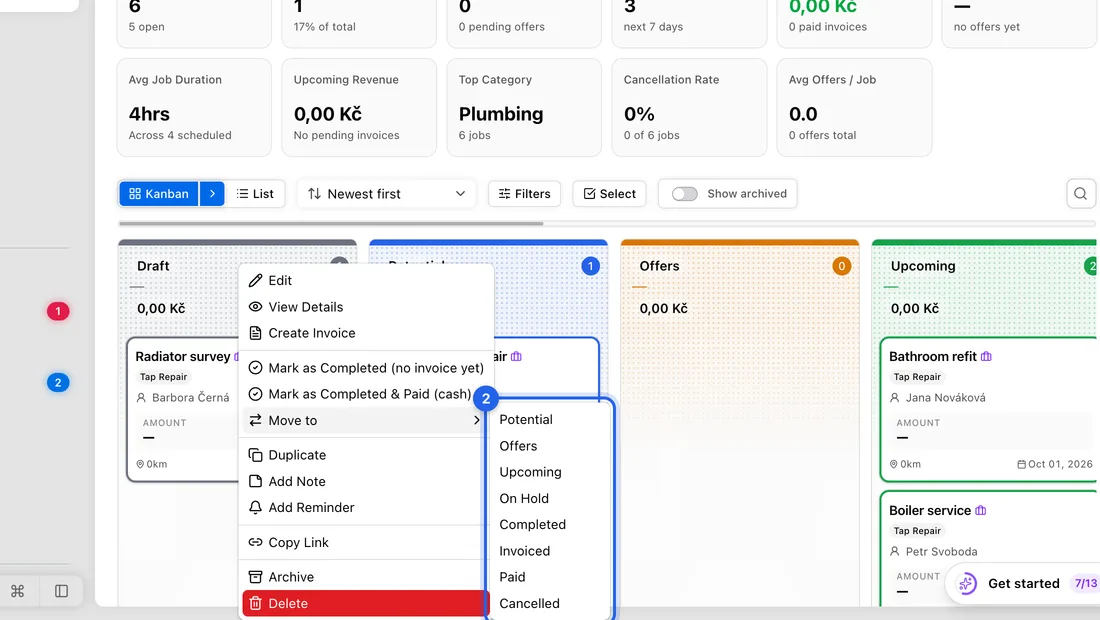
- 3To move several at once, click Select above the board and click the cards you want. Then use Move to (jobs) or Status → Mark as … (quotes and invoices) in the bar that appears.
Jobs board
The columns are Draft, Potential, Upcoming, On Hold, Completed, Invoiced, Paid and Cancelled. A job you've started still sits in Upcoming.
Moving a job to Completed takes the materials on it out of your stock.
Some moves happen on their own. A job moves to Invoiced when it gets an invoice, and to Paid once all its invoices are paid. For a job with no invoice that was paid in cash, drag it to Paid yourself.
A job can't go back to Draft once it has left it.
Quotes and invoices
Dragging a quote to Accepted marks it accepted, but it doesn't make an invoice. Use Convert to invoice on the quote for that (see Turn an accepted quote into an invoice or a job). Once a quote has an invoice, its status can't change.
Dragging an invoice from Draft to Sent only marks it as sent. It doesn't email it. To email an invoice, open it and click Send.
Dragging an invoice to Paid marks it paid in full (see Mark an invoice paid). Some moves are refused: a draft can only go to Sent or Cancelled, and a cancelled invoice can't be moved at all.
If something doesn't work
The card jumps back and you see “Jobs move to Invoiced automatically once an invoice is created.”: create an invoice for the job instead.
“This job has invoices — it'll move to Paid automatically once they're all marked as paid.”: mark the job's invoices paid.
“Posted jobs can't be moved back to Draft.”: move it to On Hold or Cancelled instead.
“Quotes converted to an invoice cannot change status”: that quote already has an invoice.
“Cannot transition invoice from … to …”: that invoice can't move to that column. A cancelled or paid invoice is corrected with a credit note.
Dragging does nothing: you're in select mode. Click the X on the selection bar or press Esc.