Reorder, recolour or hide board columns
Click the small arrow next to Kanban, then Columns. Drag columns into a new order, turn off the ones you don't need, pick colours, and click Save.
You can change how a board looks: the order of its columns, their colours, and which ones show. The columns themselves are fixed. You can't rename them or add your own, because each one is a status the app uses.
Change the columns
- 1Open Jobs from the left sidebar (Quotes, Invoices and Contracts work the same way).
- 2Make sure Kanban is selected, then click the small arrow on the right of the Kanban button. More buttons appear.
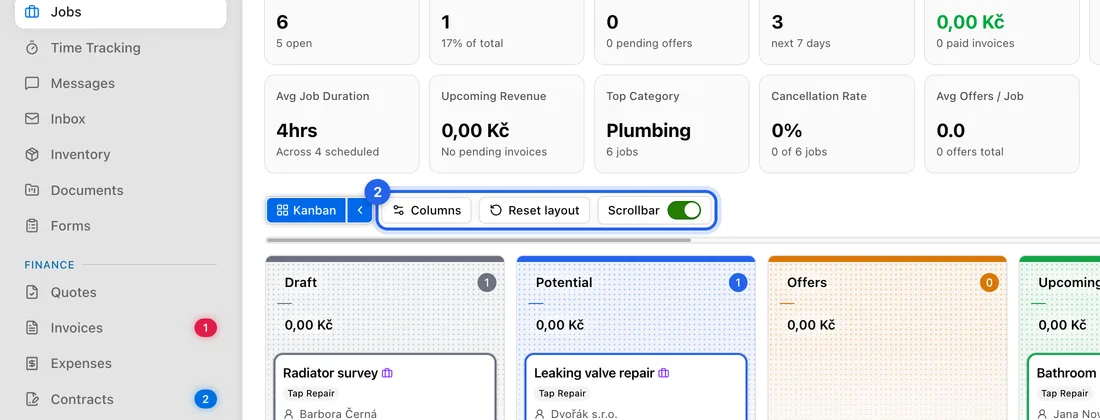
- 3Click Columns. Each column now shows a handle on the left, a switch, and two colour circles.
- 4To reorder, drag a column by its handle to a new place.
- 5To hide a column, turn off its switch. It stays greyed out while you edit and disappears once you save.
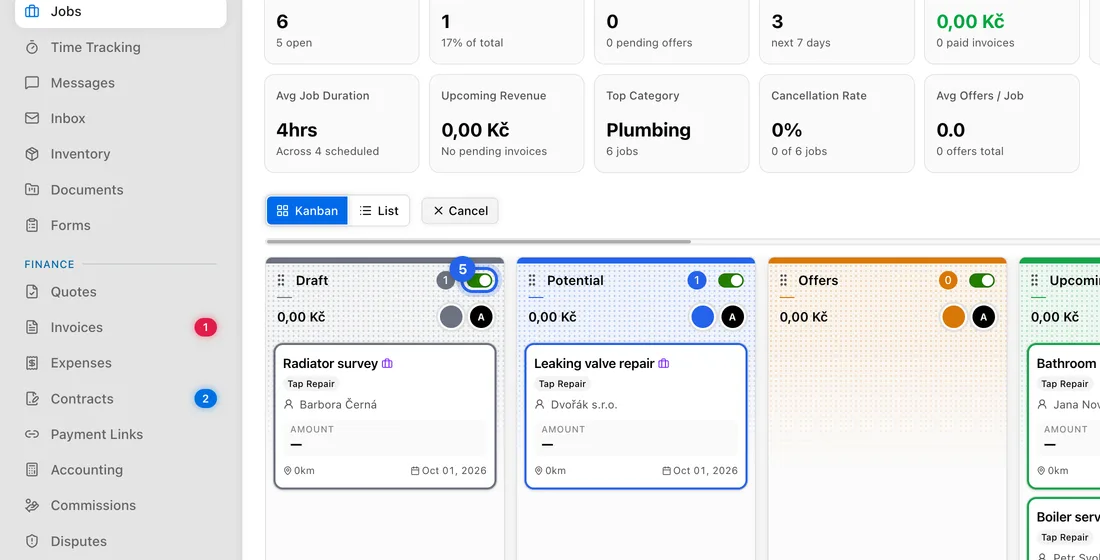
- 6To recolour, click the first circle for the background colour and the second for the text colour (the header, total and card titles). To undo a colour, click the small reset arrow next to it.
- 7Click Save. You'll see “Column layout saved”.
Changed your mind?
While editing, click the round arrow (Revert all changes) to undo everything since you clicked Columns, or Cancel (or press Esc) to leave without saving.
To go back to the original layout, click the small arrow next to Kanban and then Reset layout. It happens straight away, with no confirmation. You'll see “Layout reset to defaults”.
Good to know
Your layout is yours alone. Each team member can set up their own boards.
A hidden column's cards don't show on the board. To see them, turn the column back on or use the List view.
In the List view, Columns changes the list's columns instead.
On Jobs, the Scrollbar switch next to Columns shows or hides the scroll bar above the board.
If something doesn't work
There's no Save button: you haven't changed anything yet. It appears after your first change.
“Failed to save column layout”: nothing was saved. Check your connection and click Save again.
You want a column called something else, or a new stage: that isn't possible on these boards.