Export your data for your accountant
For your accountant, use Accounting → Exports: pick a format such as Pohoda XML, ISDOC or CSV, set the dates and click Download. For a full copy of everything, use Settings → Data & export.
There are two places to get your data out. Accounting → Exports makes files for a period in the formats accounting software reads. Settings → Data & export downloads whole lists, or one complete copy of your workspace.
Before you start
Accounting → Exports is available on Solo and up. Settings → Data & export is on every plan.
Easier still: give your accountant their own free login and let them download what they need. Go to Accounting → Bookkeeper, type their email under Invite a bookkeeper and click Send invite.
Export files for your accountant
- 1Click Accounting in the left sidebar, then Exports (under Tools).
- 2Find the card for the format your accountant asked for: CSV, XLSX, ISDOC, Pohoda XML, Money S3 XML, QuickBooks CSV, Xero CSV or Year-End ZIP.
- 3On the CSV card, pick what to export under Type: Invoices, Expenses, Journal, Credit notes or Cancelled invoices.
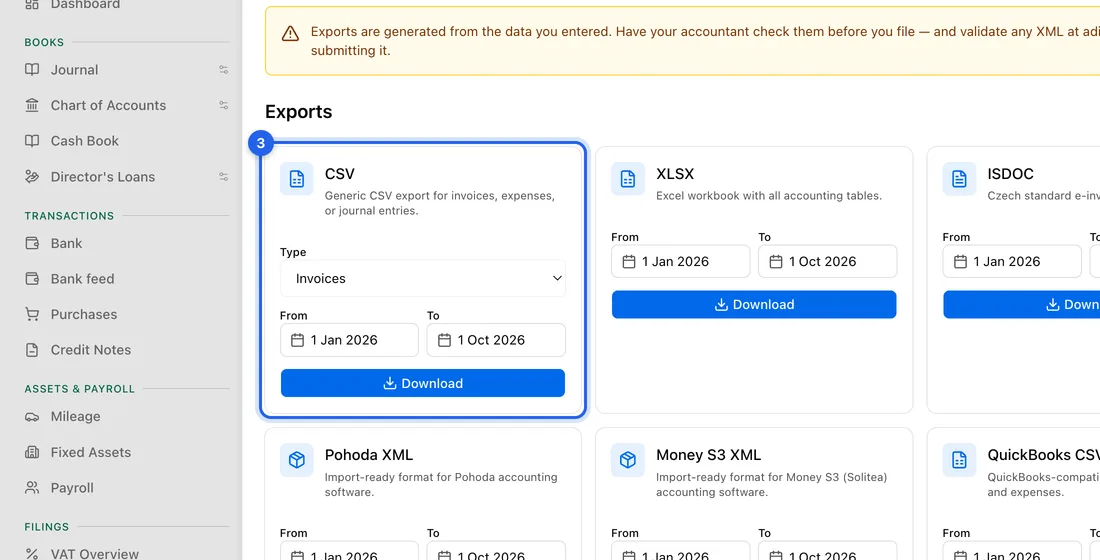
- 4Set the From and To dates. They start on your current accounting year.
- 5Click Download. The file is saved to your computer and you'll see “Downloaded”.
The Year-End ZIP takes the whole calendar year of the To date, with PDFs, XML files and summary reports. The From date doesn't change it.
Download everything
- 1Go to Settings → Data & export.
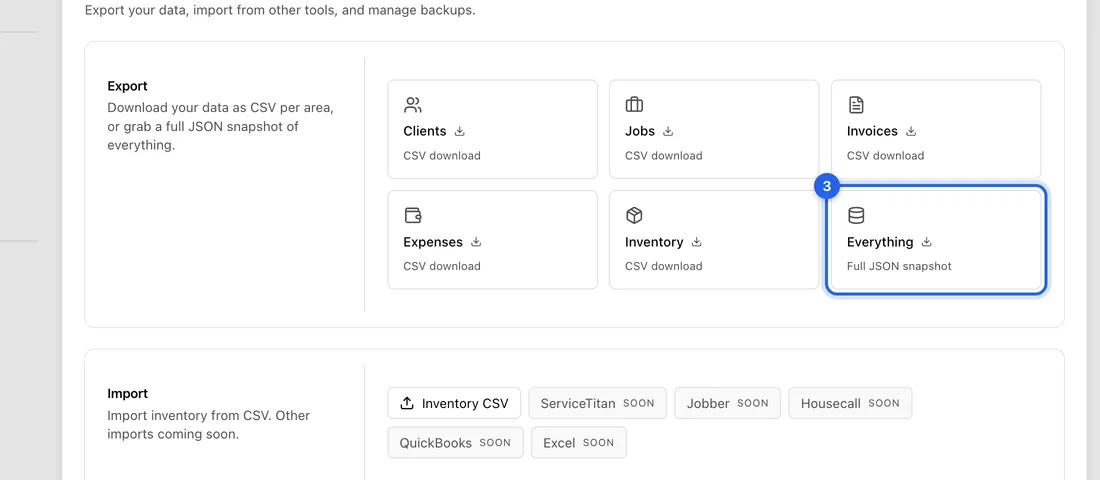
- 2Under Export, click Clients, Jobs, Invoices, Expenses or Inventory to download that list as a CSV file.
- 3Or click Everything (Full JSON snapshot). You get one ZIP file with every record as JSON and your uploaded files. On a big account it can take a minute or two.
If something doesn't work
“No invoices in range”: there are no invoices between your From and To dates. Widen the dates.
A message that documents in a foreign currency are still waiting for the day's exchange rate: the Czech National Bank publishes rates at about 14:30. Try again later that afternoon.
A message that no exchange rate could be found: open the documents it mentions and check their dates, or record them in koruna, then export again.
Czech letters look garbled in Pohoda or Money S3 (for example “á” instead of “á”): set the import encoding in that program to UTF-8.
Team members can only download from Exports if the owner ticked Accounting exports for them. The Everything download needs Business settings, and only includes what that person may see.
Exports are built from what you entered. Have your accountant check them before you file anything.