Hide your hourly rate on a quote
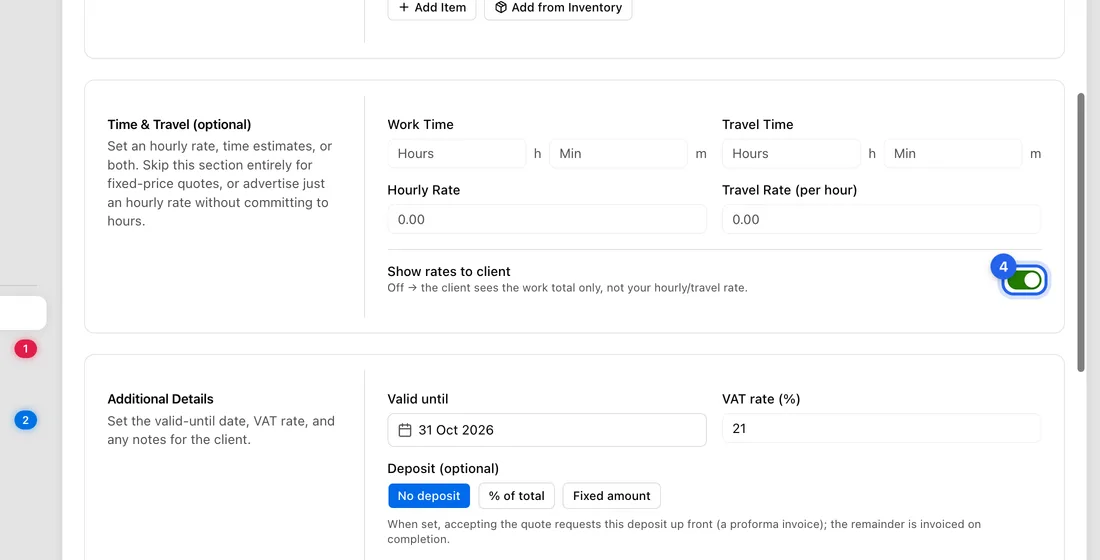
Turn off Show rates to client on the New Quote form. The client sees the time and the total for labour and travel, but not your rate per hour.
When you quote for time, the quote normally shows your hourly rate next to the labour and travel. One switch hides that rate column. The client still sees how long the work takes and what it costs.
Before you start
The switch only affects labour and travel you enter under Time & Travel (optional). Lines you type under Line Items always show their Unit Price.
Set it before you save. A saved quote can't be edited.
Hide the rate
- 1Click Quotes in the left sidebar, then New quote.
- 2Fill in the client and any lines as usual.
- 3Under Time & Travel (optional), enter the Work Time and the Hourly Rate. Add Travel Time and Travel Rate (per hour) if you charge for travel.
- 4At the bottom of that section, turn off Show rates to client.
- 5Finish the quote and click Save as draft or Save & send.
What your client sees
Labour and Travel are listed with their time and total, with no Rate column. This applies to the quote page, the PDF and your own view of the quote.
If you entered a rate but no time, the quote would normally show the rate as a guide (“Billed at actual hours”). With the switch off, that line is left out completely.
Good to know
The client can still work the rate out. For example, 4 h of labour for 3 200 Kč is 800 Kč an hour. To keep it fully private, leave Time & Travel empty and add the labour as one line under Line Items instead, for example “Bathroom fitting – labour”, Qty 1, Unit Price 3 200.
The switch is for the quote only. The invoice made from the quote shows the Labour line with its hours and rate per hour.
If something doesn't work
The rate still shows on a quote you've sent: the switch was on when you saved it. Cancel the quote (⋯ → Cancel quote) and create a new one with the switch off.
There's no Labour line on the quote: you need both a Work Time and an Hourly Rate for the app to add one.