Invite a client to their own portal
Send a client an invitation so they can sign in and see their invoices, appointments, documents and messages with you.
The portal is a private login where a client sees what's theirs with you: their invoices (which they can open and pay), upcoming appointments, shared documents and messages. They only ever see their own. It's on every plan.
Before you start
The client needs an email address on their client record. If there isn't one, open the client, click Edit details in the ⋯ menu, add the email and save.
Send the invitation
- 1Open Clients from the left sidebar and click the client's name.
- 2Click the ⋯ button at the top right of the client's page.
- 3Choose Invite to portal.
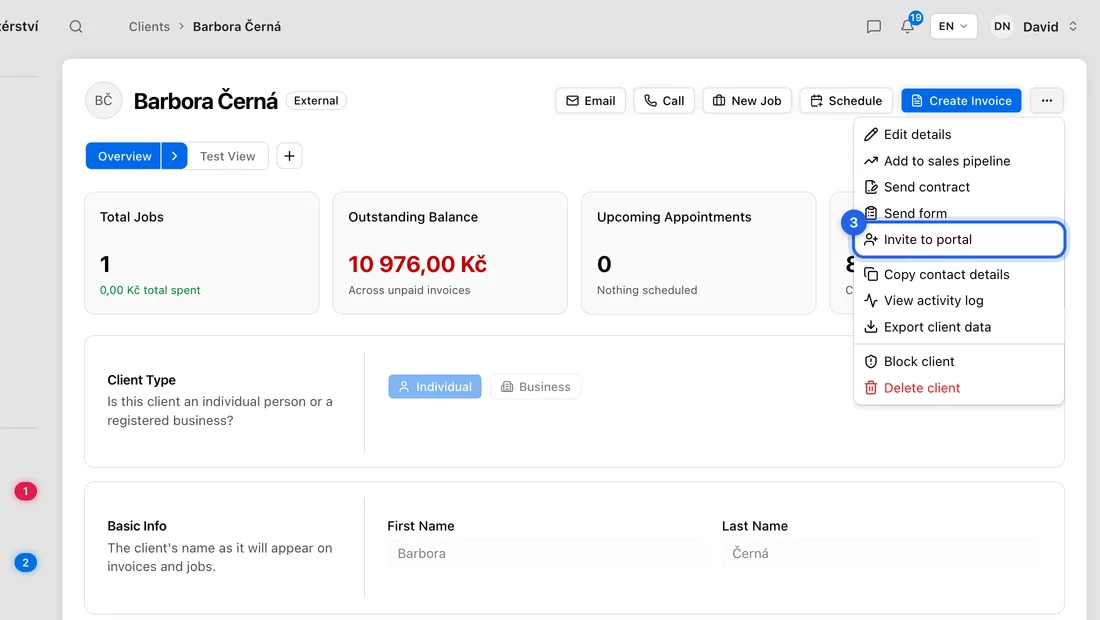
- 4You'll see “Portal invitation sent to …”. The client gets an email with a button to accept.
What the client does
The client opens the email and sees who invited them. They click Sign in, or Create account if they're new, using the same email address the invitation went to, then click Accept invitation.
When they accept, the invoices, quotes and contracts you already have for them are linked to their login, so they see their history straight away. After that they sign in to the portal at any time with that email.
They can also click No thanks to decline. Nothing is shared with you if they do.
If something doesn't work
No Invite to portal in the ⋯ menu: the client has no email address saved, or they already have their own account with you (then you'll see a Message button instead).
“An invitation is already pending for this client”: the last invitation hasn't been answered yet. It stays valid for 14 days.
The client says the link has expired: they can click “Ask … for a new invitation” on that page, then you can invite them again.
“This customer recently declined your portal invitation. You can invite them again from …”: after a decline you have to wait 5 days.
“Send the Last Invitation?”: they've declined twice. If they decline a third time, you can't invite that address again, so talk to them first.
“The invitation email couldn't be sent…”: check the client's email address and try again.
The client signed in but sees “This invitation was sent to …”: they're signed in with a different email. They need to sign out and use the address the invitation went to.