See what a job actually made you
Open the job and scroll to Profitability. It takes what you invoiced, subtracts materials, mileage and commissions, and shows the margin. Your time is not counted as a cost.
Every job has a Profitability section. It shows what you billed, what the job cost you, and the margin left over. It's on every plan.
Find it
- 1Click Jobs in the left sidebar and open the job.
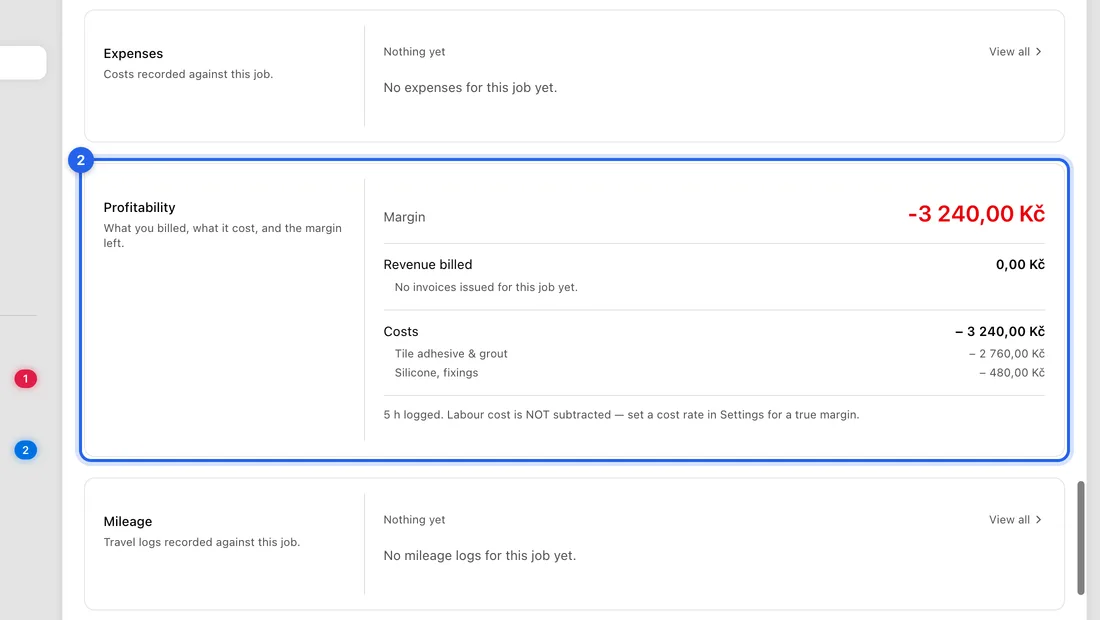
- 2Scroll down to Profitability. The big number at the top is the Margin, with the margin as a percentage next to it.
What goes into the numbers
Revenue billed: the invoices issued for this job, before VAT and in Kč. Drafts and cancelled invoices don't count.
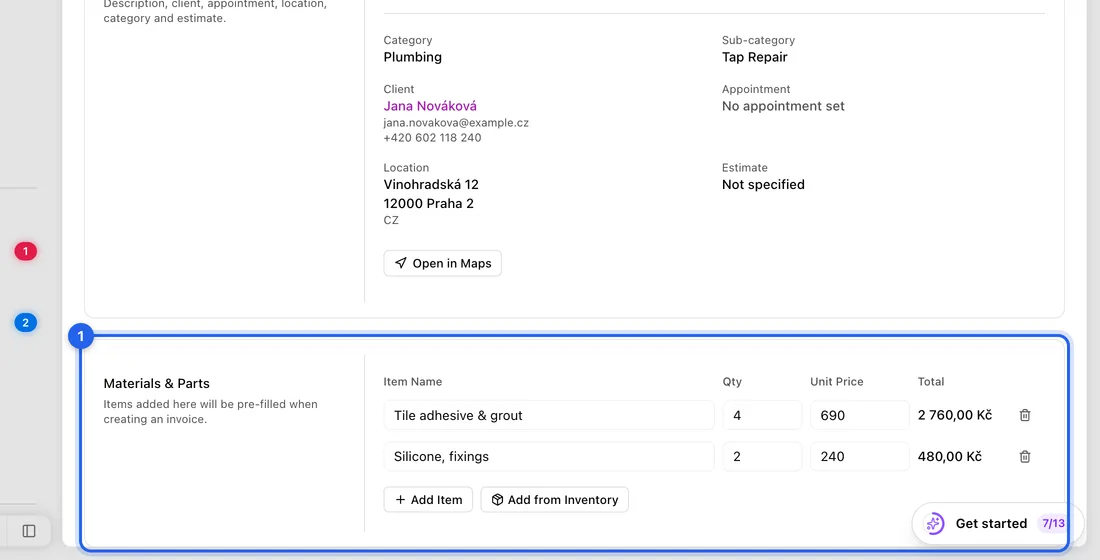
Costs: the materials under Materials & Parts, mileage trips logged against the job, and commissions you pay out on it.
Materials picked from Inventory count at the item's Retail Price, which is what you paid for it. Lines you typed yourself count at the Unit Price you typed.
Your time: the time logged on the job is shown underneath for reference, with what it's worth at your rate. It isn't taken off the margin.
An example
You invoice 10 000 Kč (before VAT) for a boiler repair. You used two valves from stock with a Retail Price of 800 Kč each (1 600 Kč), and logged a 400 Kč trip.
Costs are 1 600 + 400 = 2 000 Kč, so the Margin shows 8 000 Kč, 80%. The 5 hours you spent on the job are listed below it but not subtracted.
Get numbers you can trust
- 1Add materials to the job with Add from Inventory rather than typing them in, so they count at your buy price.
- 2Give every stock item a Retail Price (your buy price) in Inventory.
- 3Create the invoice from the job, for example with Create Invoice in the job card's right-click menu, so it's counted on this job.
- 4If you claim mileage (Solo and up), bring the trip in under Accounting → Mileage → Import from completed jobs.
Good to know
The labour cost of your time isn't subtracted. The note under the card says to set a cost rate in Settings, but there's no such setting yet, so for a job that's mostly labour the margin will look higher than your real profit.
Expenses can't be linked to a job from the app yet, so none show under Costs.
The card covers one job at a time. There's no report across all jobs.
If something doesn't work
“No invoices issued for this job yet.” even though you've invoiced: the invoice is still a draft, or it isn't on this job. An invoice made from a quote before the job existed stays off the job.
The margin is negative: you've recorded costs but not invoiced yet. It fixes itself once you issue the invoice.
A material shows as a cost equal to what you charged: it was typed in by hand, so its Unit Price is counted. Remove it and add it from Inventory instead.
No Profitability section: you're a team member without access to reports. Ask the account owner.