Change language, currency or date format
Switch the app language with the EN/CS button in the top bar. Set your invoice currency in Settings → Invoicing, and date and number formats in Settings → Locale & format.
Three different things, set in three places: the language the app speaks to you, the currency your new invoices and quotes use, and how dates and amounts look on your screen.
Change the app language
- 1Click the EN or CS button in the top bar, just left of your name.
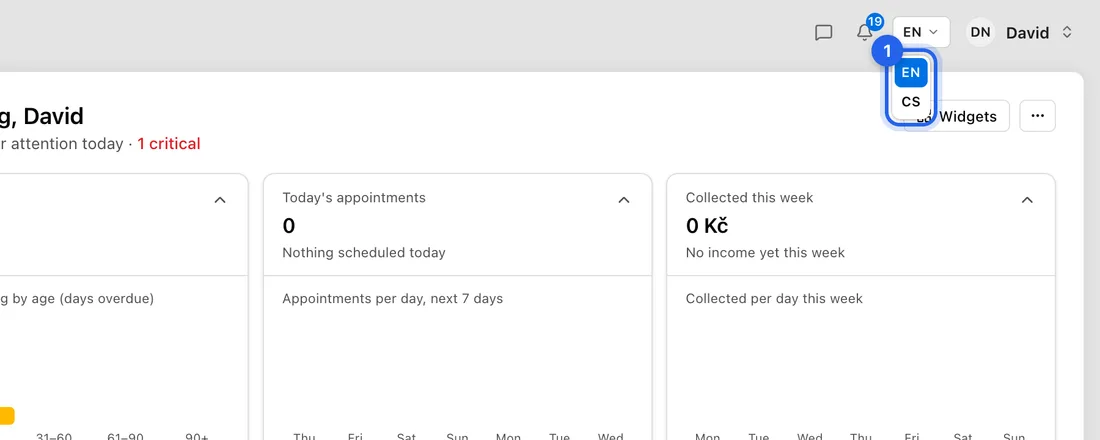
- 2Pick EN for English or CS for Czech. The page reloads in that language.
On a phone or narrow window the app has no language button yet. Open the JobMistr home page, pick the language with the globe icon at the top, then sign in. The app remembers the choice in that browser.
Change the language of an invoice
The app language doesn't decide what your client reads. On the new-invoice form, under Invoice Language, click Česky or English. It sets the labels, dates and amount format on the PDF and in the email.
To set it once per client: open the client, click ⋯ (More actions) → Edit details, pick Česky or English under Default invoice language, and click Save Changes. Auto follows the app language you're using.
Change your currency
- 1Go to Settings → Invoicing.
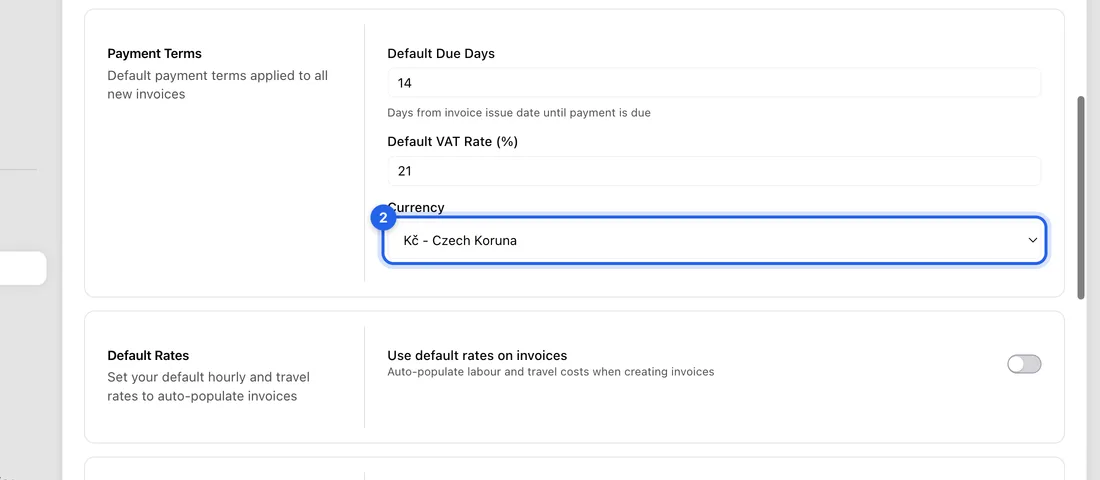
- 2Under Payment Terms, open Currency and pick the currency. Kč - Czech Koruna is the default. The list holds every currency the Czech National Bank publishes a daily rate for.
- 3Click Save changes at the bottom right.
New invoices and quotes use this currency. Invoices you've already made keep theirs. There's no currency choice on the invoice form itself, so to bill one client in euros, switch the setting, create the invoice, then switch back.
Change date, time and number formats
- 1Go to Settings → Locale & format (under Preferences).
- 2Pick your Time Zone, then click the Date Format, Time Format and Number Format you like. Each button shows an example, for example 17 Apr 2026 or 1 234,56 Kč.
- 3Click Save changes at the bottom right.
These formats are saved in this browser only. On another computer or phone, set them again. They change what you see on screen, not your invoice PDFs.
Good to know
Settings → Languages is not the app language. It lists the languages you speak, which clients see on your profile.