Late-payment interest and the overdue bell
An overdue invoice shows the statutory late interest it has built up. Freeze it to lock the figure on a given day. Clear the red bell on the invoices board once you've chased it.
Once an invoice is past its due date, the app works out the late-payment interest the law lets you claim and shows it on the invoice. The rate is the ČNB repo rate on the first day of the half-year in which the invoice fell due, plus 8 percentage points, per year, on what's still owed.
The app shows this figure for your information. It doesn't add it to the invoice, the PDF or the reminders.
Before you start
This is on every plan. Nothing needs switching on.
The interest appears once an invoice is at least a day overdue and something is still owed. It never appears on paid, cancelled or written-off invoices.
See the interest
- 1Click Invoices in the left sidebar and open the overdue invoice.
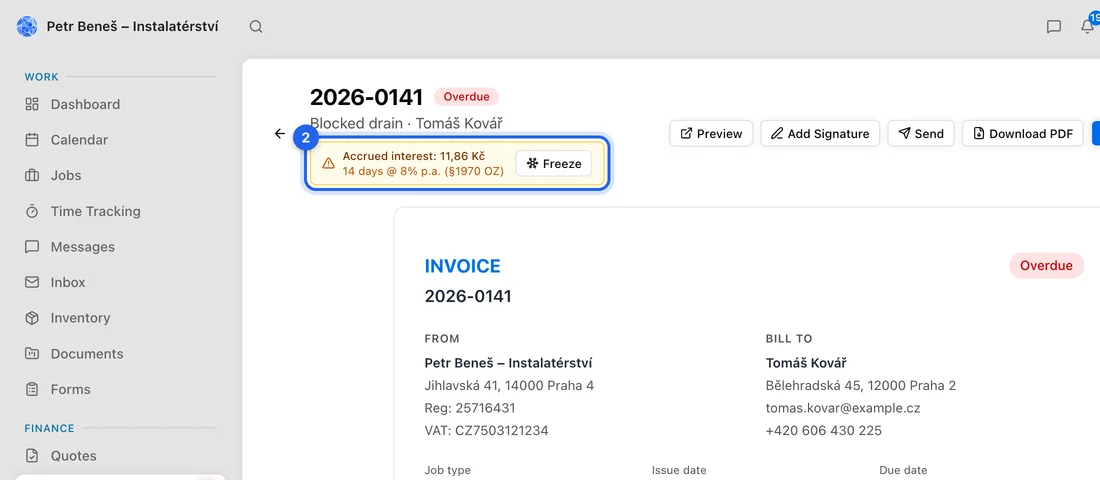
- 2Under the invoice number there's a yellow box: Accrued interest, the amount, and below it how many days at what rate, e.g. “30 days @ 11.5% p.a. (§1970 OZ)”.
When an invoice is more than 30 days overdue, you also get a Late-payment interest accrued notification with the figure.
Freeze the interest
- 1In the yellow box, click Freeze.
- 2Confirm the question “Freeze the accrued interest at today's value?”. You'll see “Interest frozen.”
- 3The box now reads Interest (frozen) with the date it was frozen, and the amount stops growing.
Freeze on the day you write to the client asking for the interest, so the figure on the invoice page matches your letter. It can't be undone in the app, and the frozen figure appears only in this box.
Clear the overdue bell
- 1On Invoices, in the board view, an overdue invoice's card has a red bell and a red dashed border.
- 2Click the bell. The card shows Overdue and how many days, e.g. “12 days overdue”.
- 3Click Mark read. The bell and the red border go away.
Clearing the bell doesn't mark anything paid. The invoice stays in the Overdue column, on your Dashboard and in the reminder schedule until it's paid.
What happens next
For example: 20 000 Kč is still owed and the invoice is 30 days late. If the repo rate was 3.5%, the rate is 11.5% a year, so the interest is 20 000 × 11.5% × 30 ÷ 365 = 189.04 Kč. Each extra day adds about 6.30 Kč, until you freeze it or the invoice is paid.
The app doesn't bill the interest for you. To claim it, ask the client for it in writing, quoting the frozen figure.
If something doesn't work
There's no yellow box: the invoice isn't past its due date yet, or nothing is left to pay (it's paid, fully credited, cancelled or written off).
Two invoices show different rates: the rate is fixed by the half-year each invoice fell due in, so invoices due in different half-years can differ.
“Failed to freeze.”: nothing changed. Try again.