Chase unpaid invoices automatically
The app emails your client before the due date and keeps reminding them after it until they pay. Change when in Settings → Invoicing.
You don't need to switch anything on. Once an invoice is sent, the app emails your client on its own: 7 days and 3 days before the due date, on the due date, 1 day after it, and then every 7 days until it's paid. You can change all of these.
Before you start
Reminders work on every plan, including Free. They don't count towards your monthly email allowance.
Your client needs an email address saved. Reminders only go out for invoices that have been sent, not drafts.
Deposit (advance) invoices are never chased. Neither are invoices you recorded as issued outside JobMistr.
Set the reminders before the due date
- 1Open Settings from the left sidebar and choose Invoicing.
- 2Find Payment Reminders. Each row is one email: a number and days before due date, or on due date.
- 3Change a number to move a reminder. Click Add Reminder for another one, or the X on a row to remove it.
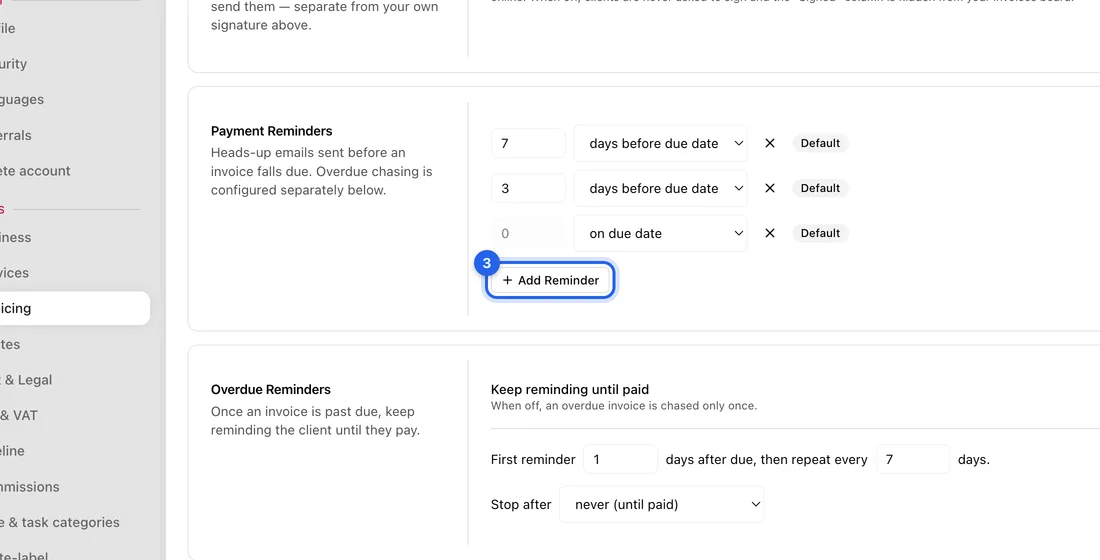
- 4Changed your mind? Click Reset to Default to go back to 7 days, 3 days and the due date.
- 5Click Save changes at the bottom right. You'll see “Invoice settings saved successfully”.
Set the reminders after the due date
- 1On the same page, find Overdue Reminders.
- 2Leave Keep reminding until paid switched on.
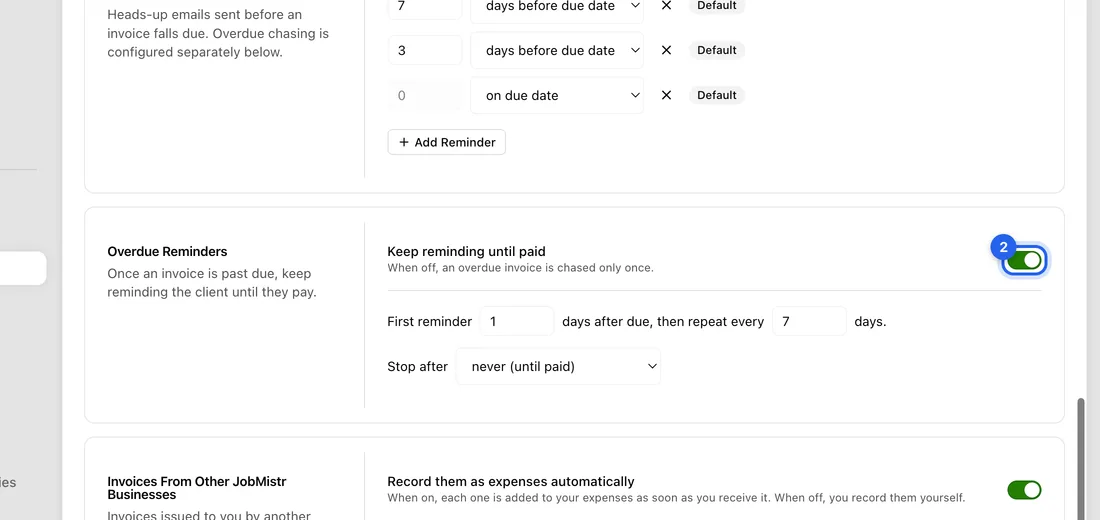
- 3Set First reminder … days after due, then repeat every … days. For example 1 and 7.
- 4Under Stop after, keep never (until paid), or choose a set number of reminders and type how many.
- 5Click Save changes.
What happens next
For example, with the settings as they come, an invoice due on 20 October gets emails on 13 October, 17 October, 20 October, 21 October, 28 October, 4 November and so on until it's paid.
Each reminder has the invoice PDF attached and a link to pay. A client never gets more than one reminder a day for the same invoice. They go out once a day.
The day after the due date, the invoice changes to Overdue and you get an Invoice overdue notification.
Reminders stop by themselves once the invoice is paid in full, cancelled, or fully credited with a credit note. Your changes apply to invoices you've already sent too.
If something doesn't work
The client didn't get anything: check they have an email address, and that the invoice was sent rather than saved as a draft.
Nothing goes out after the due date: Keep reminding until paid is switched off. When it's off, no reminders are sent once the invoice is overdue at all, only the ones before the due date.
You sent an invoice only 2 days before its due date: the 7-day and 3-day reminders are already past, so the client gets one reminder for both, not two.
“No pre-due reminders configured…”: you removed every row under Payment Reminders. Clients get no heads-up before the due date, but overdue reminders still go out.