Reclaim or repay VAT when you register or deregister
When you become a VAT payer, claim back the VAT on things you still have (§79). When you stop, work out what you must repay (§79a). Both go on line 45 of your VAT return.
When you register for VAT, you can claim back the VAT you paid on things you still have on your registration day: stock and materials bought in the last 12 months, and part of the VAT on equipment and vehicles. When you stop being a payer, you repay VAT on what you still hold in the same way.
Example: you bought a drill for 12 100 Kč, of which 2 100 Kč was VAT, two months before you registered, and you still use it only for work. You can claim the 2 100 Kč on your first VAT return. Fuel, rent, phone bills or last month's software subscription don't count, because they're already used up.
Before you start
Available on Solo Pro and up.
Your VAT status must be VAT registered, with VAT registered since filled in from the tax office's decision (Settings → Business).
The worksheet lists what you've recorded in the app: expenses with VAT on them and items under Accounting → Fixed Assets. Record purchases with their VAT before you register, even as a non-payer, so they're there to choose from.
Claim VAT when you register (§79)
- 1Click Accounting in the left sidebar. Under Filings, click VAT Overview.
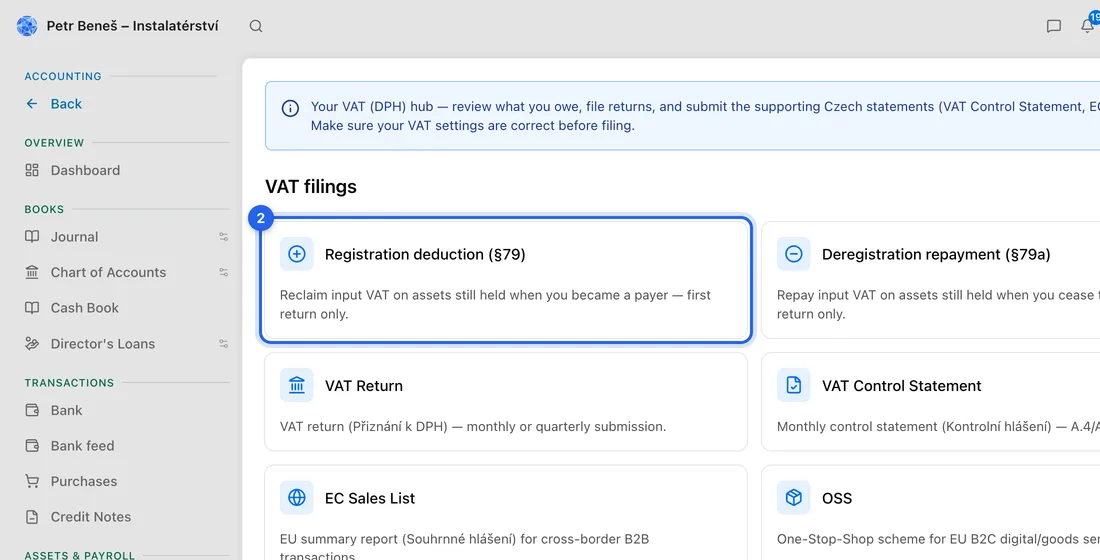
- 2Click the Registration deduction (§79) card.
- 3Read the yellow note: you can only claim things you still have on your registration day.
- 4In the table, tick Incl. for each item you still have.
- 5Check Business use % (e.g. 50 for a car you also drive privately) and Still held % (less than 100 if you've used up part of the stock).
- 6If a ticked row shows VAT not verified, tick “I hold a tax document from a VAT-registered supplier showing … of VAT on this purchase”, or untick the row if you don't have one.
- 7Check Total to reclaim on first return and click Save worksheet. You'll see e.g. “Saved — 3 items, 4 200 Kč to reclaim”.
The amount goes on line 45 of your first VAT return on its own. The line “On line 45 of your return now” under the total shows what's there. You only tick what you still have; the app can't check that for you.
Repay VAT when you deregister (§79a)
- 1Go to Settings → Business and click Not VAT registered.
- 2In Turn Off VAT Registration, set Your last day as a VAT payer, tick the confirmation and click Turn VAT Off. Then click Save changes.
- 3Go to Accounting → VAT Overview and click Deregistration repayment (§79a). The yellow note on Settings → Business also links there.
- 4Tick Incl. for each item you still have, check Business use %, and click Save worksheet.
- 5Check Total to repay on final return. It's added to line 45 of your last VAT return.
If something doesn't work
“No VAT registration date is set…”: click Set it in Accounting settings and fill in VAT registered since.
“Check your VAT registration date”: the date may have been filled in automatically when VAT was switched on. Click Check it in Accounting settings, correct the date if needed, click This date is correct and then Save settings.
“No eligible assets or inventory found.”: nothing with VAT was recorded in the 12 months before your registration date, and you have no fixed assets. Add the missing purchases as expenses with their VAT, then come back.
“The VAT on one of the selected purchases was worked out by the app…”: tick the tax-document confirmation on that row, or leave the row out.
“The §79 worksheet cannot claim more for period …”: that return is already marked as filed. You can still reduce a claim, but to increase it you have to withdraw the filing first.