Set your VAT status
Tell the app whether you're a VAT payer, with your DIČ and the date you registered, before you send your first invoice.
Your VAT status decides whether your invoices add VAT. Set it before you send invoices.
For example, a job for 10 000 Kč: if you're Not VAT registered, the invoice asks for 10 000 Kč, carries no VAT and says “Není plátcem DPH”. If you're VAT registered, it adds 21% (2 100 Kč), asks for 12 100 Kč and is headed “Faktura – daňový doklad” with your DIČ.
Before you start
This is on every plan. If you're a payer, have your DIČ and the date your registration took effect, as written on the tax office's decision, to hand.
If you're a team member rather than the owner, switching VAT on or off needs the Bookkeeping permission. Without it the two status buttons are greyed out.
Set your status
- 1Open Settings from the left sidebar and choose Business.
- 2Under Business Details, type your IČO into Registration Number (IČO) and click the search button next to it. Your business name, DIČ and address are filled in from ARES.
- 3Under Your VAT status, click Not VAT registered or VAT registered. The one you chose shows Selected.
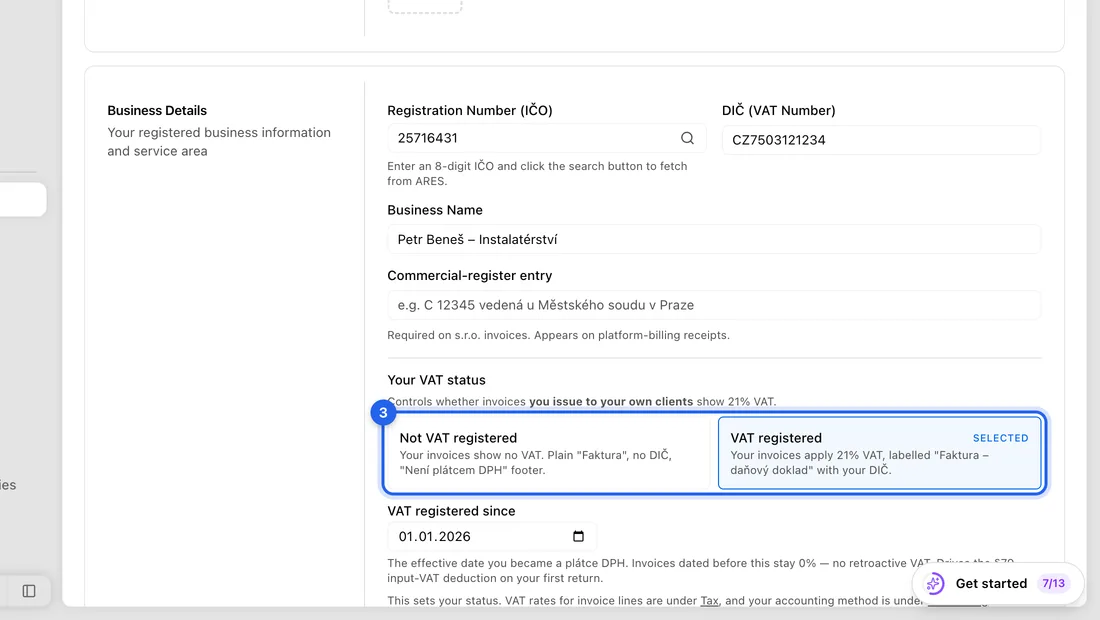
- 4If you chose VAT registered: check DIČ (VAT Number), which now appears next to your IČO, e.g. CZ12345678.
- 5Still for payers: fill in VAT registered since with the date from the tax office's decision, not today's date unless that's really it.
- 6Click Save changes at the bottom right. You'll see “Business settings saved successfully”.
Filing VAT returns from the app?
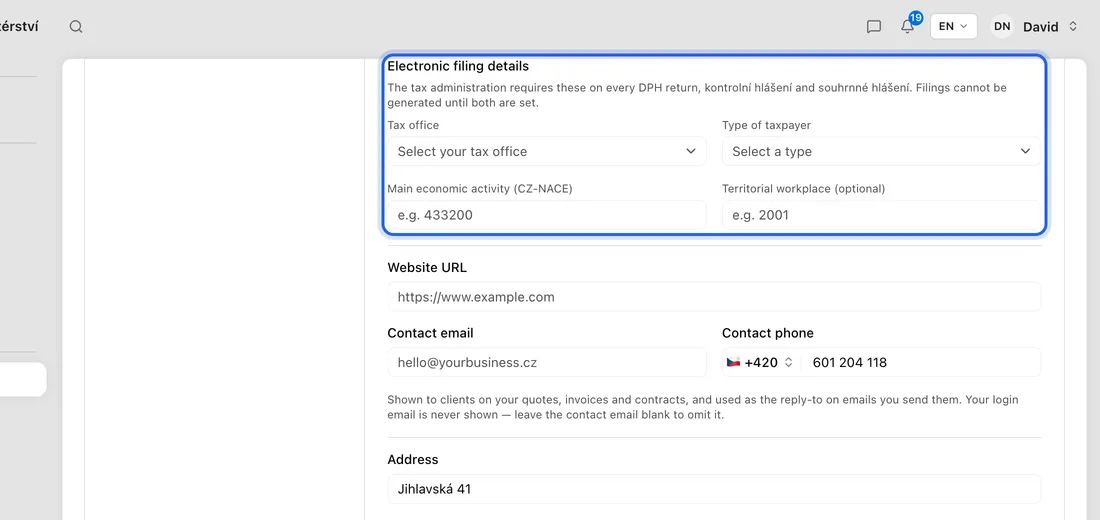
Further down, under Electronic filing details, pick your Tax office and Type of taxpayer (Natural person or Legal entity), and fill in Main economic activity (CZ-NACE). The app can't build a VAT return, kontrolní hlášení or souhrnné hlášení until the tax office and taxpayer type are set. Save again afterwards.
What happens next
New invoices follow your status. As a payer, invoices dated before your VAT registered since date stay at 0%: the app never adds VAT backwards.
If you have recurring invoices, a message “What this did to your recurring invoices” lists the ones the change affected.
Other VAT settings
Your status lives here in Business. VAT rates for invoice lines are under Settings → Tax & VAT, and your accounting method is under Settings → Accounting → Regime & method. The note below Your VAT status links to both.
If something doesn't work
“Enter the date you became a VAT payer before saving…”: you chose VAT registered but left VAT registered since empty. Every VAT figure in the app hangs off that date.
“This VAT number is already registered to another business.”: another JobMistr workspace already uses that DIČ. Check it for typos.
“No company found with that IČO.” or “IČO must be 8 digits.”: check the number. You can also type the details in by hand.
Stopping being a payer: clicking Not VAT registered opens Turn Off VAT Registration, which asks for the date your registration was cancelled.